Incident and DOSH reporting
From the first report on a phone to the JKKP 8 annual summary, every step of an incident is in one record.
- Quick report with photos, GPS location and injured person details
- Investigation with 5 Whys or fishbone, root cause and witnesses
- Suggests when JKKP 6 or 7 is needed and counts down the 7-day deadline
- JKKP 8 annual register, LTIFR and TRIR worked out for you
- Your own workflow: severity levels, who is told at each level, and stage deadlines in hours or working days
- HSE classifies new incidents and verifies actions from the phone
How it flows
- Report Phone, photos and GPS Status in ELIX: Reported
- HSE review Classify and check JKKP 6/7
- Investigate 5 Whys or fishbone Status in ELIX: Investigating
- Actions Owners and due dates
- Close Closed with a full record Status in ELIX: Closed
UAUC observations
Make it easy for everyone to speak up about what they see on site, good and bad.
- Unsafe act, unsafe condition, safe act and safe condition
- Your own categories, sites and areas
- Anonymous option and Stop Work records
- Escalate a serious observation to an incident in one step
- QR code posters per site or area: anyone, contractors included, reports without logging in
- Review, raise actions, close or escalate from the phone
How it flows
- Observe In under a minute Status in ELIX: Reported
- Review Type, category and risk Status in ELIX: Under review
- Action Owner and due date Status in ELIX: Action in progress
- Close Closed or escalated Status in ELIX: Closed
HIRARC risk register
Hazard identification, risk assessment and risk control in the format DOSH auditors expect.
- Likelihood and severity matrix with initial and residual risk
- Controls by hierarchy, from elimination to PPE
- Approval workflow and scheduled reviews
- Controls become tracked actions with owners and due dates
How it flows
- Identify Hazards for each activity Status in ELIX: Draft
- Assess Likelihood and severity
- Control By hierarchy, down to PPE
- Approve Through your approval steps Status in ELIX: Approved
- Review On a set schedule
Permit to Work
Control high-risk work with permits that check the right people, tests and isolations are in place.
- Hot work, confined space, work at height, electrical, excavation and lifting
- Gas test readings with limits and retest reminders
- Isolation records and clash detection for the same area
- Live permit board, suspension, extension and handback
How it flows
- Request Work, crew and hazards Status in ELIX: Draft
- Gas test Readings against limits
- Isolate Isolations recorded
- Approve Signed off by approvers Status in ELIX: Pending approval
- Active On the live board Status in ELIX: Active
- Close Handback, then closed Status in ELIX: Closed
Inspections
Plan inspections, run them on the phone and turn every finding into an action.
- Checklist templates with Yes / No / N/A or 1 to 5 ratings
- Critical questions, scores and a photo on each question
- Works offline in plant areas with no signal
- Findings raise corrective actions automatically
How it flows
- Schedule From your templates Status in ELIX: Scheduled
- Inspect On the phone, even offline Status in ELIX: In progress
- Findings Photos and scores Status in ELIX: Completed
- Actions Raised automatically
Qualifications and certificates
Know who is competent for the job, and get told before a certificate expires.
- Malaysian certificate types such as SHO, AGTES, AESP, CIDB and chargeman
- HSE verifies each certificate with a copy on file
- Expiry reminders to the person and HSE
- Permit checks warn or stop when a required certificate is missing
How it flows
- Add With a copy of the certificate Status in ELIX: Pending verification
- Verify Checked by HSE Status in ELIX: Verified
- Remind Before it expires
- Report Competency register
Contractor management
Approve contractors before they start, keep their documents and workers in date, and stop permits for anyone who is not cleared.
- Register with subcontractors, contacts and verified documents
- Scored pre-qualification aligned to ISO 45001 clause 8.1.4, with critical questions
- Workers with photo, certificates, site inductions and a cleared status with the reasons
- Permits block or warn for contractors not cleared or workers with expired certificates
- Performance reviews scored from linked incidents, UAUC and inspections
- Expiry reminders to HSE and the contractor, and a worker check by name or IC on the phone
- Contractor workers do not count towards your user limit
How it flows
- Register Company and documents Status in ELIX: Draft
- Pre-qualify Scored questionnaire Status in ELIX: Under review
- Approve Approved until a set date Status in ELIX: Approved
- Induct Site induction for workers
- Work Cleared for permits
- Review Performance score
Plant & Equipment
Know which equipment is fit to use, and keep plant without a valid certificate, or with a defect, out of service.
- 22 starter equipment types, including the certificate of fitness categories of the OSH (Plant Requiring Certificate of Fitness) Regulations 2024, editable per company
- Certificate of fitness history and a CF calendar, with reminders at 90, 60, 30 and 0 days
- Fit to use worked out from status, CF expiry and overdue inspections, always with the reasons
- Defects with tag-out, and return to service only by an authorised person
- Daily pre-use checks on the phone, also offline; a critical fault tags the item out
- Permits check that the plant is fit and the operator holds the right certificate
How it flows
- Register Type and details Status in ELIX: In service
- CF and inspection Dates and reminders
- Pre-use check Daily, on the phone
- Defect and tag-out Taken out of use Status in ELIX: Out of service
- Return to service By an authorised person Status in ELIX: In service
Training
Plan who needs which training, record it once, and see competence gaps before an auditor does.
- Training needs matrix by role, department, job title or contractor workers, per site
- 15 Malaysian starter courses, editable per company
- Sessions with booking, attendance and scores that create training records and certificates
- Toolbox talks from the desk or the phone, also offline, with photos
- Permits check the courses a permit type needs from its crew
- ISO 45001 clause 7.2 competence report and refresher reminders at 60, 30 and 0 days
How it flows
- Needs Matrix by role and site Status in ELIX: Never done
- Plan Sessions and bookings
- Attend Attendance and scores
- Record Record and certificate Status in ELIX: Valid
- Refresh Reminder before expiry Status in ELIX: Due soon
Legal Register
Know which Malaysian HSE laws apply to your company, who owns each requirement and where you stand.
- Library of Malaysian HSE laws and their requirements
- A wizard asks about your company and builds your register
- Register items with owners, status and due-date reminders, and a compliance % on the dashboard
- Professional and Enterprise: compliance evaluations with evidence (files, links and ELIX records) and a printable report for audits
- Professional and Enterprise: your own laws and requirements, and notices when a law changes
How it flows
- Answer A few questions about your company
- Register The laws and requirements that apply Status in ELIX: Not assessed
- Assign Owners and due dates
- Evaluate With evidence for each requirement Status in ELIX: Compliant
- Report Printable report for audits
Chemical management
One register for every chemical you use, with the SDS, the CHRA and the monitoring results behind it.
- Chemical register per site and store with GHS classes, pictograms, signal word and H / P statements
- SDS library with revisions; an SDS older than 5 years is flagged
- New-chemical requests approved by HSE before purchase
- CHRA records with the assessor, recommendations as actions and review reminders
- Exposure monitoring against the PEL, with the action level flagged
- Store QR posters: workers see first aid, PPE and spill response on the phone, offline
How it flows
- Request Before it is bought Status in ELIX: Waiting for HSE
- Approve HSE checks the SDS
- Register Hazards, store, users Status in ELIX: In use
- Assess CHRA and monitoring
- Review Reminders before due
PPE management
Know what each person needs, what they were given and when it must be replaced.
- Catalogue with standards, sizes, life and minimum stock
- Stock per store and size: receive, write off, count
- Issue to employees, contractor workers and visitors; receipt confirmed on the phone
- PPE matrix by job title, department, area, chemical or HIRARC control, with missing PPE listed
- Respirator fit tests and harness inspections with expiry reminders
- Cost and issue reports with CSV
How it flows
- Request Phone or web Status in ELIX: Requested
- Issue From a store
- Acknowledge Person confirms receipt Status in ELIX: Issued
- Replace Replace-by reminder
Safety & Health Committee
Run the committee the way the regulations expect, with every meeting and decision on record.
- Members, roles, terms and printable appointment letters
- Quarter view that warns when a quarter passes without a meeting
- Agenda with standing items and matters arising from open decisions
- Attendance, minutes per agenda item and decisions that become actions
- Minutes approved by the chairperson, printable in English and BM
- Committee workplace inspections with the next due date
How it flows
- Plan Date and agenda Status in ELIX: Planned
- Notify Notice to members
- Meet Attendance and minutes
- Decide Decisions to actions
- Approve Chairperson signs off Status in ELIX: Minutes approved
Document control
Keep policies and procedures current, approved and read by the people who need them.
- Register of policies, manuals, procedures, SWPs, ERPs and forms
- Revisions approved before they take effect; the old one is kept as superseded
- Review dates with reminders to the owner
- OSH policy signed by top management
- Read and acknowledge by role, department or person, with tracking
- Documents to read on the phone, offline
How it flows
- Draft New revision Status in ELIX: Draft
- Approve Approval workflow
- Publish In force Status in ELIX: Approved
- Acknowledge Readers confirm
- Review Before the review date
ISO audit, review and objectives
The check and act steps of ISO 45001: audits, findings, management review and objectives.
- Yearly audit programme with clause coverage and approval
- Audit team competence and independence checks
- Editable ISO 45001 checklist with C / NC / OBS / NA and evidence
- Findings with root cause, corrective action and verification of effectiveness
- Management review with the clause 9.3 inputs filled from ELIX data
- OSH objectives with figures entered by owners or counted by ELIX
How it flows
- Plan Audit programme Status in ELIX: Approved
- Audit Checklist and evidence
- Findings NC, OBS, OFI
- Correct Actions
- Verify Effectiveness checked Status in ELIX: Closed
Management of change
Changes are assessed and approved before they happen, then reviewed once they are in use.
- Change requests from any staff member, permanent or temporary
- HIRARC link required and approved before final approval
- Two-step approval: HSE, then management
- Pre-start checklist before the change is put into use
- Post-implementation review; temporary changes have an end date and a reminder
- Printable change form and CSV register
How it flows
- Request Any staff member Status in ELIX: Draft
- Assess Linked HIRARC
- Approve HSE and management Status in ELIX: Approved
- Pre-start Checklist done Status in ELIX: In use
- Review After the change Status in ELIX: Closed
Emergency preparedness
Every site ready for an emergency, and the proof that it was tested.
- Emergency plan per site: alarm signal, what everyone does, drill interval, printable notice
- Scenarios with response steps, assembly points and emergency contacts
- Emergency response team with roles and a certificate check
- Drills with evacuation time against the target, head count and findings as actions
- Emergency equipment register with QR labels and monthly checks; a defect raises an action
- Alarm instructions, assembly points and contacts on the phone, offline
How it flows
- Prepare Plan, team, equipment
- Check Monthly by QR
- Drill Evacuation timed Status in ELIX: Done
- Improve Findings to actions
Occupational health
Who is exposed to what, and the health checks that follow, with medical details kept confidential.
- Exposure groups with hazards, people and chemicals from the register
- Noise risk assessment with zones and hearing protection areas
- Hearing tests with a standard threshold shift check and follow-up action
- Medical surveillance by the OHD: fitness, restrictions, next due date
- Initial ergonomic risk assessment with recommendations as actions
- Findings visible only to authorised staff and the person
How it flows
- Group Who is exposed
- Assess Noise and ergonomics
- Test Hearing and medical
- Follow up Actions and next due
Scheduled waste
Each container of scheduled waste tracked from the day it starts to the day the facility receives it.
- Waste types with SW codes and hazards; stores with the 180-day and 20-tonne limits
- Containers with days left to the storage limit and quantities logged by QR
- Scheduled waste labels with SW code, hazards and date of first generation
- Licensed transporters and receivers with licence and SW code checks
- Consignments with the eSWIS consignment note number and receipt
- Monthly inventory per site and SW code, ready to submit in eSWIS
How it flows
- Start Container labelled Status in ELIX: In storage
- Log Quantities by QR
- Consign Licensed transporter Status in ELIX: Collected
- Receive Facility confirms Status in ELIX: Received
- Report Monthly inventory
ESG and sustainability reporting
The performance data for your Sustainability Statement, with the records behind every figure.
- Bursa common sustainability indicators C1 to C11 in English and BM, plus your own
- Safety, training, contractor and waste figures filled from ELIX with their source records
- Scope 1, 2 and 3 emissions and energy from monthly activity data and a factor table with sources
- Sign-off by the Sustainability Manager and Committee; locked years and restatements with reasons
- Targets with a base year, absolute or intensity
- Bursa 3-year performance data table, evidence pack and CSI export
How it flows
- Collect Monthly activity data
- Calculate Factors per year
- Review Owners complete
- Sign off Committee approves Status in ELIX: Locked
- Report Bursa data table
Action Tracker and the core platform
Every module shares one set of users, sites, approvals and actions, included in every package.
- One action list from every module, with owners and due dates
- Approval workflows, notifications and e-mail reminders
- Safety dashboard with your key indicators
- Audit trail, user roles, your logo, English and BM
How it flows
- Raise From any module Status in ELIX: Open
- Assign Owner and due date
- Do Completion note and photos Status in ELIX: In progress
- Verify Evidence checked Status in ELIX: Pending verification
- Close Done and on record Status in ELIX: Closed
ELIX Field mobile app
Works where the work happens, even without signal
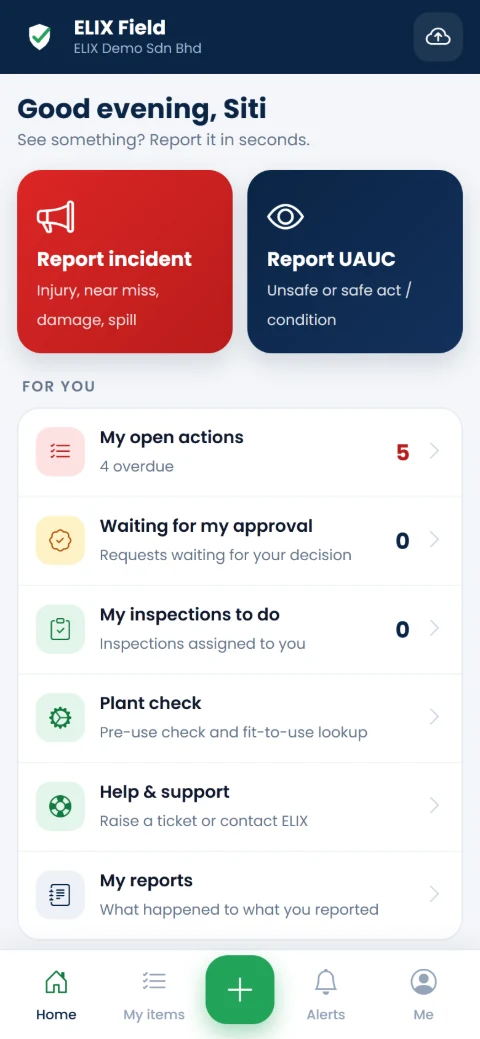
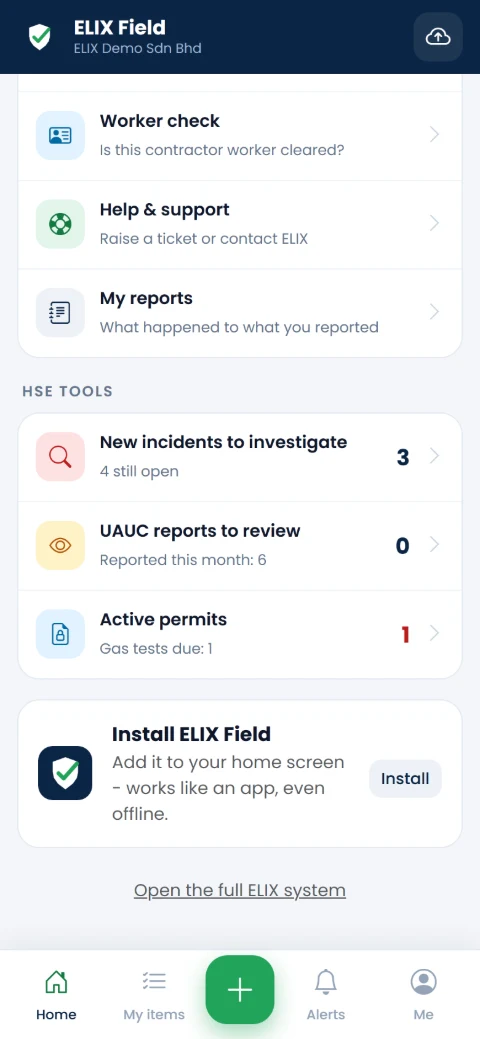
Install ELIX Field on any Android phone or iPhone from the browser. No app store, no extra login.
- Staff report incidents and UAUC in seconds, with photos and location.
- HSE officers review UAUC reports, classify incidents, approve, verify actions and carry out inspections on site, all from the phone.
- Offline first: fill in reports, inspections, plant pre-use checks and toolbox talks in areas with no coverage; they send when signal returns.
- Two languages: every screen in English or Bahasa Malaysia, as each user prefers.
One app, two home screens
See ELIX with your own sites and forms
Book a demo in English or Bahasa Malaysia, or start a free trial.